Doors:
Here are described the different types of doors, defined by their function.
This type of door is one that a player can break
with combat. In the editor you will notice that different
assets have different 'type' tags.
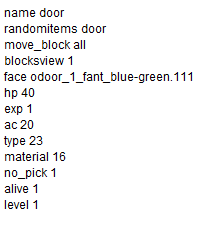
note:
'randomitems' is the treasure list that will be drawn from when this door is broken. This usually traps or other hazards. This line draws from a separate file called a trs which is in the arch, or asset.
'hp' is the life total of doors of this type
'type' defines the function of the item, if you change this it will no longer behave the same way. When broken this will also open any adjoining doors of the same type.
It is possible to create a key that is type 24
which will automatically open this door on
contact. With this type of door the key is
consumed
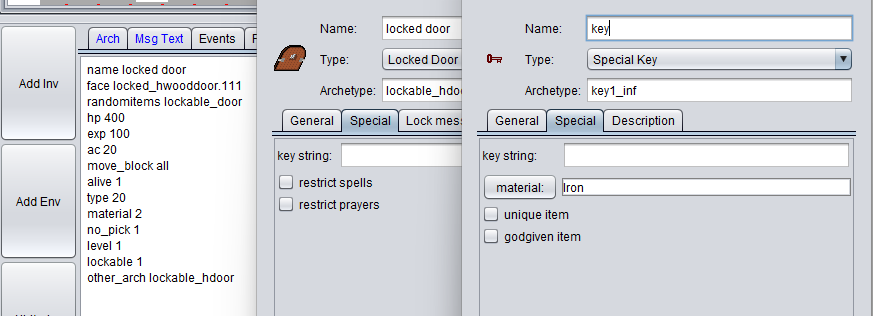
This type of door is one that a player needs
a key to open. It will be necessary to define a key
item. This door will ONLY open when a player
holding the key bumps into it.
This type of key-door combination DOES NOT
consume the key upon use.
This door is type 20, it requires a key that is type 21
Key strings must match.
This type of door is one that functions
as a teleporter between maps.
There needs to be an appropriately formatted
exit_path.
If the HP or SP tags are omitted a player will
enter in the top-left corner of the map.
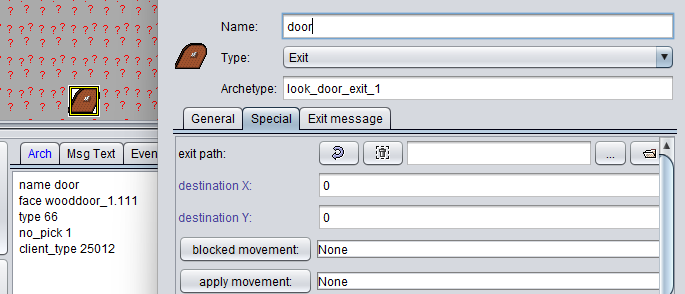
By setting an exit path and destination, it is possible to use
this exit to move a player from one map to another.
When incorrectly formatted there appears a warning in-game
that says this exit is closed.
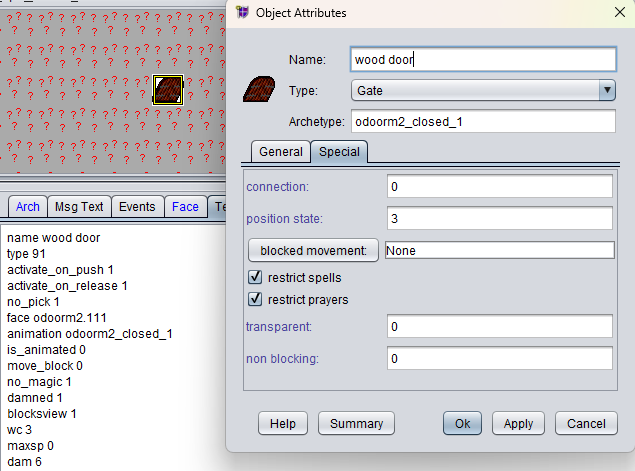
This type of door is one that operates
through the use of a button or other trigger.
The connection field must match the button
trigger's connection field.
It is possible to make this door stay activated
if the activate_on_release field is manually
modified from 1 to a value of 0 though
Gridarta will resist this change. Force the save
and it'll work as it should.
Experiment with the available fields.
it is possible to make doors you can fly over,
or dimension door through.
Within this category are gates which have been used to create simple logic systems that power the internal mechanisms of some of the buildings. You might consider what kind of automation could add flavor to your designs.
Additional notes:
It is possible to define a custom face for all assets while editing by modify the 'face' tag. This can be done within the Attributes tab OR done manually. An error will cause the asset to show no_face.
It is possible to manually change type of objects, it would be best to spend some time experimenting with all kinds of creations in a testing environment.
It is possible to define a message that displays when any of these doors are applied. You might thing about this when designing your space; a little flavor text goes a long way.